> For the complete documentation index, see [llms.txt](https://docs.lsports.eu/u/llms.txt). Markdown versions of documentation pages are available by appending `.md` to page URLs; this page is available as [Markdown](https://docs.lsports.eu/u/coverage-hub/notifications.md).
# Notifications
Stay informed about coverage changes across the LSports platform
The Coverage Hub Notification Center gives you real-time visibility into coverage changes across LSports ARENA360 platform.
***
## Overview
Notifications keep you informed automatically. When coverage changes, you see it.
The Notification Center has two tabs:
* **Notifications** — the feed of coverage changes
* **Delivery Methods** — how those changes reach you
The **Notifications** tab is split into two sub-tabs:
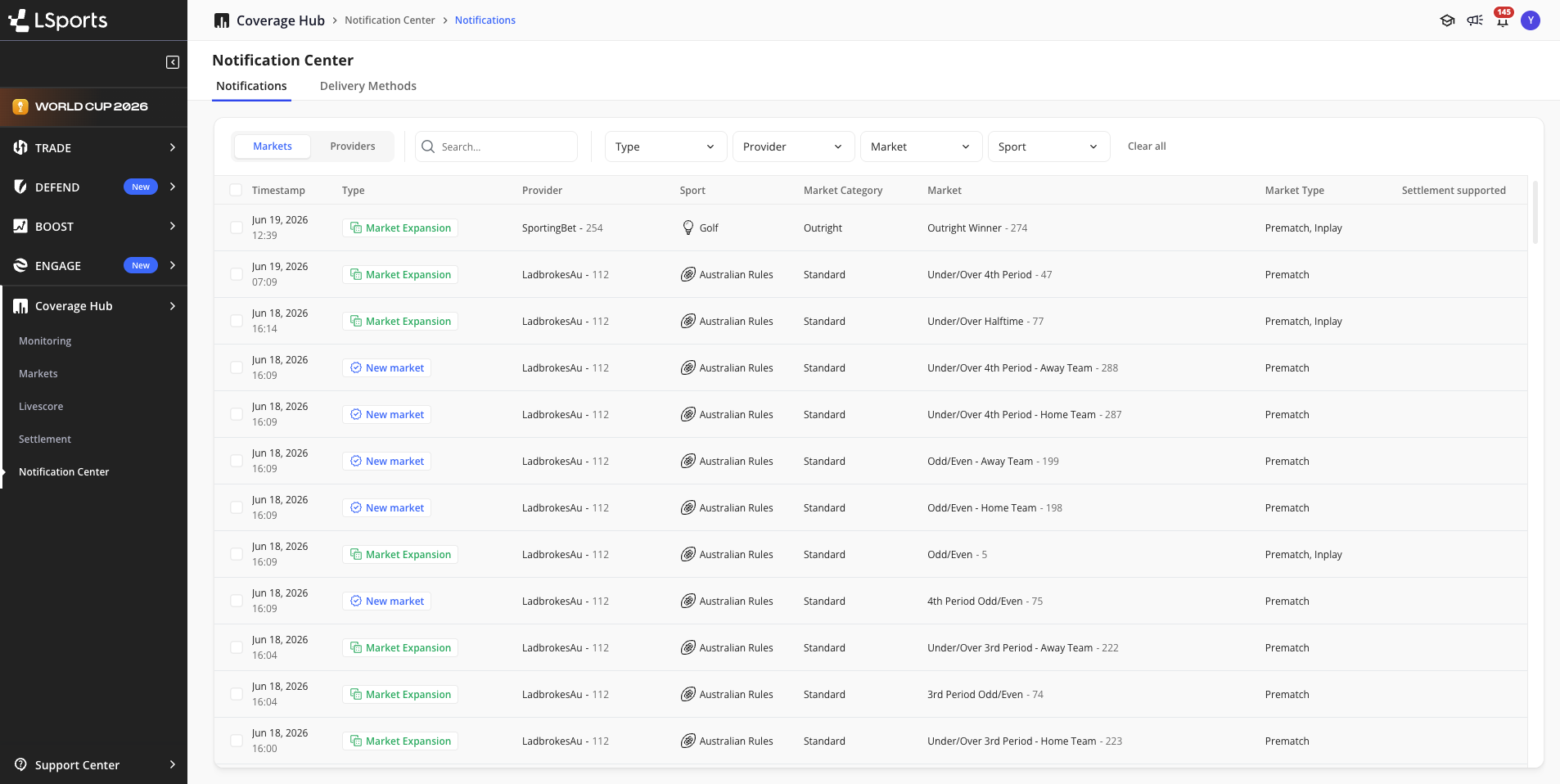
* **Markets** — changes to market coverage: new markets, market expansions, and settlement support
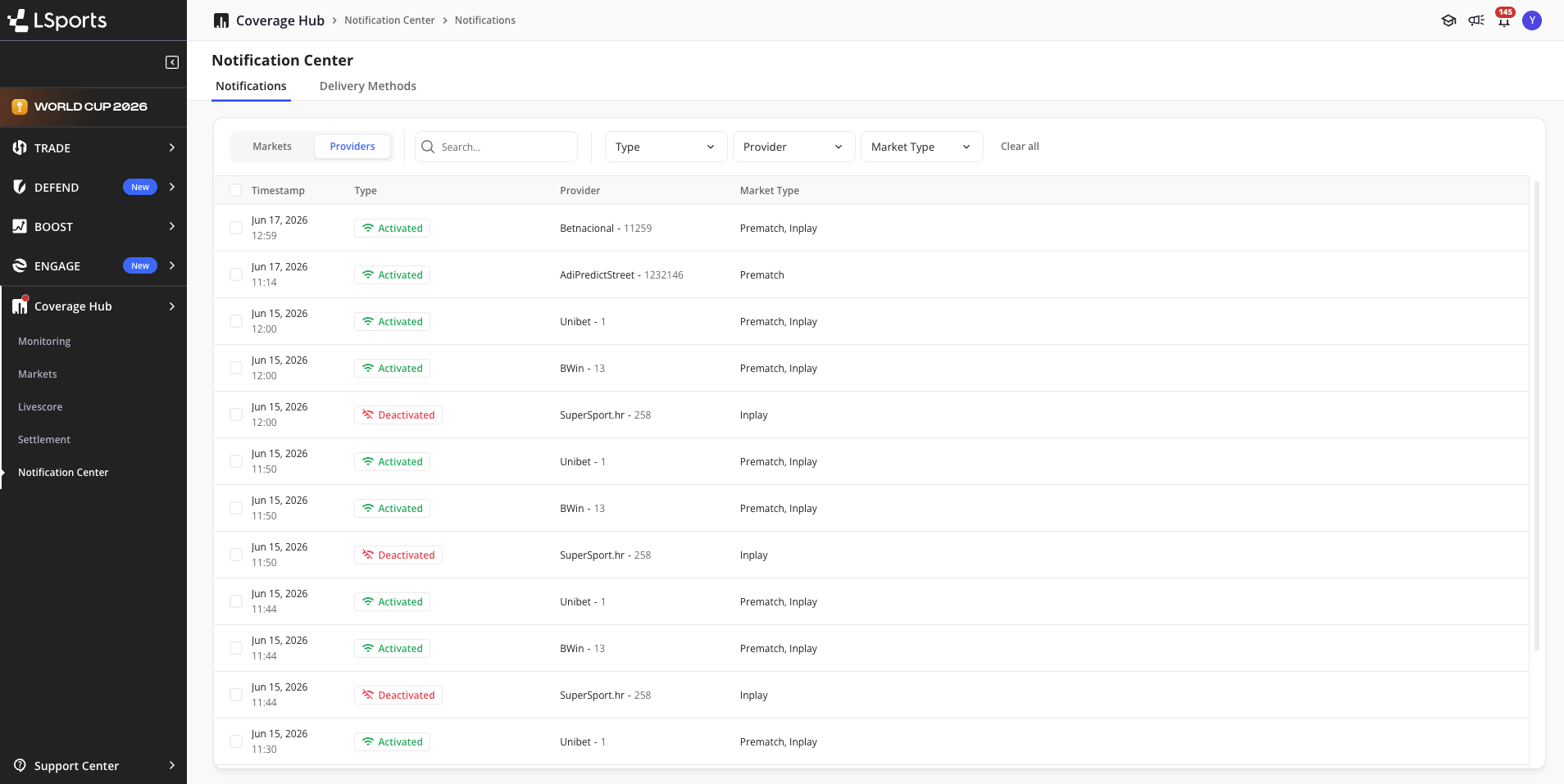
* **Providers** — changes to provider status: new providers, providers being activated or deactivated
In-app notifications are batched and delivered once per hour.
You can also have coverage changes delivered to your own systems via email or webhook. See [Delivery Methods](#delivery-methods).
***
## Getting Started
On your first visit to the Notification Center, a one-time registration popup appears before you access the feed.
**To register:**
1. Navigate to **Notification Center** in the Coverage Hub sidebar
2. Under **In-app notifications**, toggle on the notification types you want to receive:
* **Markets**
* **Settlements**
* **Providers**
3. Click **Register**
You only receive notifications from your registration date onwards. There is no backfill of earlier coverage changes.
You can configure your preferences at any time from the **Delivery Methods** tab.
***
## Markets Notifications
The **Markets** tab tracks changes to market coverage across providers.
The Markets tab in the Notification Center
| Type | What It Means |
| ------------------------ | ------------------------------------------------------------------------------------- |
| **New Market** | A market not previously available on the platform has been added by a provider |
| **Market Expansion** | An existing market is now supported by an additional provider |
| **Settlement Supported** | A market that previously had no settlement logic now has confirmed settlement support |
Each Markets notification includes:
| Field | Description |
| ------------------------ | ----------------------------------------------------- |
| **Timestamp** | When the change was detected |
| **Type** | New Market, Market Expansion, or Settlement Supported |
| **Provider** | Provider name and ID |
| **Sport** | Sport the market belongs to |
| **Market Category** | Category of the market |
| **Market** | Market name and ID |
| **Market Type** | PreMatch, InPlay, or both |
| **Settlement Supported** | Checkmark if settlement is confirmed |
You can filter the Markets tab by **Type**, **Provider**, **Market**, and **Sport**.
***
## Providers Notifications
The **Providers** tab tracks changes to provider availability.
The Providers tab in the Notification Center
| Type | What It Means |
| ---------------- | ----------------------------------------------------- |
| **New Provider** | A provider appears on the platform for the first time |
| **Activated** | A provider has become available on the platform |
| **Deactivated** | A provider is no longer available on the platform |
Each Providers notification includes:
| Field | Description |
| --------------- | ---------------------------- |
| **Timestamp** | When the change was detected |
| **Type** | Activated or Deactivated |
| **Provider** | Provider name and ID |
| **Market Type** | PreMatch, InPlay, or both |
You can filter the Providers tab by **Type**, **Provider**, and **Market Type**.
***
## Delivery Methods
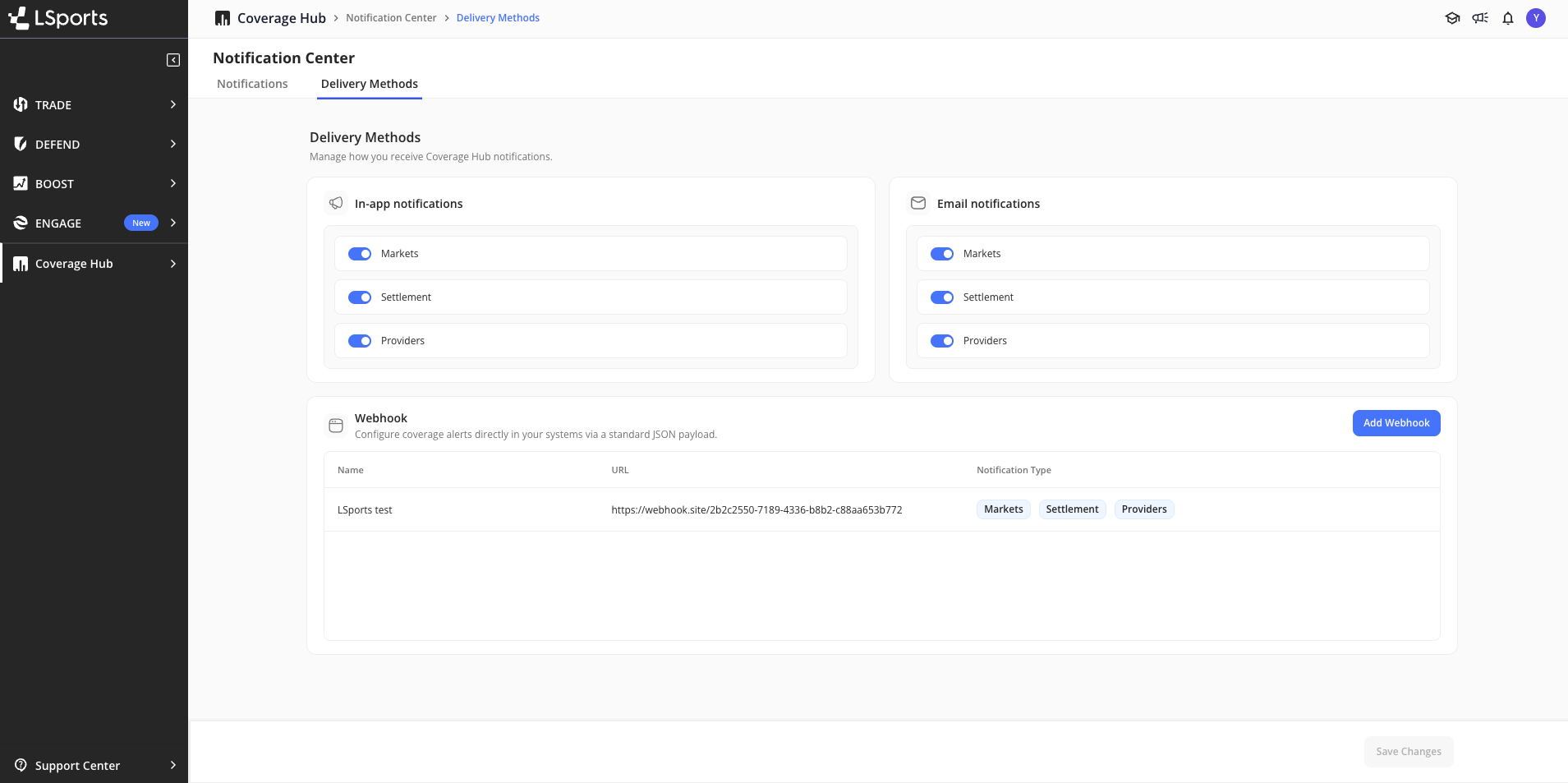
Choose how coverage changes reach you from **Notification Center** → **Delivery Methods**.
In-app and email preferences are set per user: everyone on your account picks their own notification types. Webhooks work differently. They belong to the account, and any user on the account can add, edit, or delete them.
The Delivery Methods tab, with in-app, email and webhook delivery
***
## Webhook Delivery
A webhook sends coverage changes straight into your own systems as an HTTP POST, so alerts can trigger automation instead of waiting for someone to open the platform. Point it at your internal tooling to drive workflows, or at a Slack incoming webhook URL to post alerts into a channel with nothing in between.
The **Webhook** panel on the Delivery Methods tab lists every webhook on your account with its name, URL, and the notification types it delivers.
### Setting up a webhook
1. Go to **Notification Center** → **Delivery Methods**
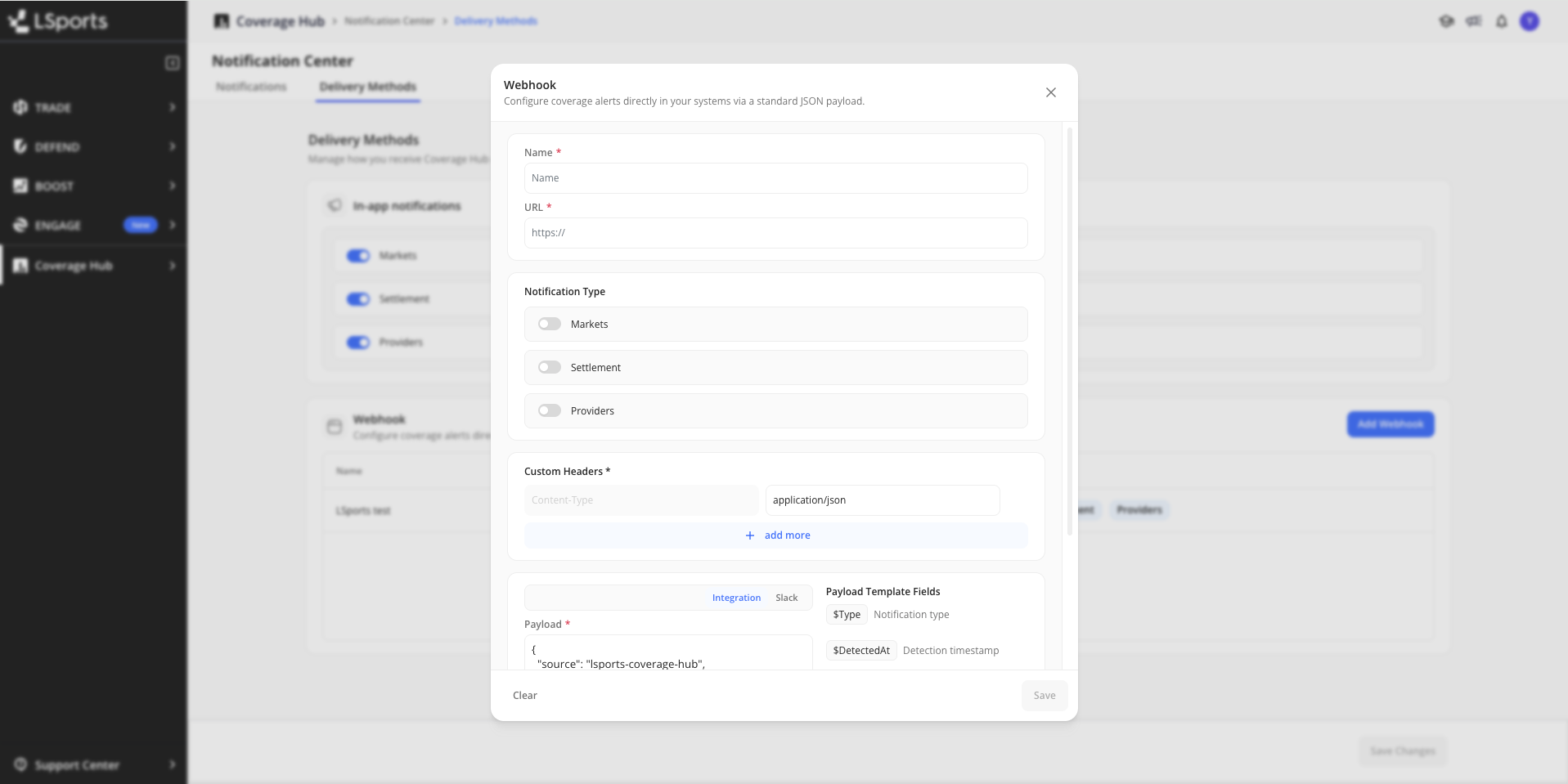
2. In the **Webhook** panel, click **Add Webhook**
3. Complete the dialog:
| Field | Description |
| --------------------- | ---------------------------------------------------------------------------------------------------------------------------------------------------------------- |
| **Name** | Required. A label for this webhook, for example "Risk Tool" or "Slack Alerts" |
| **URL** | Required. Your HTTPS endpoint. The URL is validated when you save |
| **Notification Type** | Required. Turn on at least one of **Markets**, **Settlement**, and **Providers**. You cannot save without one |
| **Custom Headers** | `Content-Type: application/json` is set for you and cannot be changed or removed. Click **add more** to send additional headers, such as an authentication token |
| **Payload** | Required. The JSON body sent on each delivery. Start from the **Integration** or **Slack** preset and edit it, or write your own |
4. Click **Save**
Your webhook appears in the table, where you can edit or delete it later.
### Payload presets
The dialog gives you two starting points. Both are editable.
**Slack** posts a readable digest straight to a channel. Point it at a Slack incoming webhook URL and it works as is:
```json
{
"text": "Coverage Hub - $Type\nEvents: $EventCount | Detected at: $DetectedAt\n\n$EventsText"
}
```
The first two lines come from the template, so you can reword them. The summary and the list of changes come from `$EventsText`.
**Integration** wraps the batch in a JSON envelope for your own systems:
```json
{
"source": "lsports-coverage-hub",
"type": "$Type",
"detectedAt": "$DetectedAt",
"events": $EventsJson
}
```
### Batch template fields
Your payload is a template. On every delivery, Coverage Hub replaces these fields with values describing the batch. They are the five fields listed in the **Payload Template Fields** panel next to the payload editor.
| Template Field | Value Sent |
| -------------- | ---------------------------------------------------------------------------------------------------------------------------------- |
| `$Type` | What the message covers: `Coverage` (markets and settlements together), `Markets`, `Settlements`, or `Providers` |
| `$DetectedAt` | When the cycle detected the changes, in UTC, for example `2026-08-18T10:00:00Z` |
| `$EventCount` | Number of coverage changes in this message |
| `$EventsText` | The coverage changes as Slack-formatted text: a summary line followed by one bullet per change. Ready to drop inside a JSON string |
| `$EventsJson` | The same digest as a Slack Block Kit `blocks` array, with a header, a summary line, and the list of changes |
### What a digest contains
Each message is a digest of every change found in the cycle, grouped the same way as the email digest.
**Summary line.** Counts per category, for example `New Markets: 1 | Market Expansions: 2 | Settlement Supported: 1`. Only the categories your webhook is subscribed to appear.
**One bullet per change**, in this order:
| Bullet | What It Shows |
| ------------------------- | ---------------------------------------------------------------------------------------------------------------------------------------------- |
| **New Market** | A market new to the platform, with its name and ID, sport, category, match type, and the providers that added it |
| **Market Expansion** | An existing market that gained providers, with the providers that were added |
| **Settlement Supported** | A market that now has confirmed settlement. Shows `Providers: All`, because settlement applies to every provider currently offering the market |
| **New Provider** | Providers that appeared on the platform for the first time, listed under InPlay and PreMatch |
| **Providers Deactivated** | Providers that lost InPlay or PreMatch coverage, or both |
| **Providers Activated** | Providers that gained InPlay or PreMatch coverage, including providers returning after a deactivation |
If a market is added by several providers in the same cycle, it appears once as a single **New Market** bullet listing all of them.
### Example delivery
Using the **Slack** preset, an hourly cycle with market and settlement changes posts this message:
```
Coverage Hub - Coverage
Events: 3 | Detected at: 2026-08-18T10:00:00Z
New Markets: 1 | Market Expansions: 1 | Settlement Supported: 1
• New Market — First home team Player Serve - Game Winner (3432) · Tennis · Standard · Prematch · Providers: DoradoBet
• Market Expansion — Under/Over (2) · Football · Standard · Prematch, InPlay · Providers: Bet365
• Settlement Supported — Asian Handicap (3) · Football · Standard · Prematch, InPlay · Providers: All
```
A Providers message looks like this:
```
Coverage Hub - Providers
Events: 1 | Detected at: 2026-08-18T11:55:00Z
New Providers: 0 | Providers Deactivated: 0 | Providers Activated: 1
• Providers Activated · InPlay: Unibet
```
### Using Slack Block Kit
For richer Slack formatting, send `$EventsJson` as the message blocks:
```json
{
"text": "Coverage Hub - $Type: $EventCount changes",
"blocks": $EventsJson
}
```
Slack shows the blocks in the channel and uses `text` only for the notification preview. Very large digests are trimmed to fit Slack's message limits, and the message ends with a note pointing you to Coverage Hub for the full list.
### When webhooks are sent
| Notification type | Detection cycle |
| ----------------- | --------------- |
| **Markets** | Hourly |
| **Settlement** | Hourly |
| **Providers** | Every minute |
Each webhook receives one message per cycle. When an hourly cycle finds both market and settlement changes, and your webhook is subscribed to both, they arrive together in one message with `$Type` set to `Coverage`. Provider changes always arrive in their own message.
When a cycle finds no changes, nothing is sent. Quiet periods produce no empty deliveries.
### Testing your webhook
Verify your setup before pointing it at production tooling:
1. Go to [webhook.site](https://webhook.site) and copy the unique URL assigned to you
2. In the **Webhook** panel, add a webhook using that URL as the endpoint
3. Turn on **Providers**. Providers run every minute, so you get feedback fastest
4. Wait for the next cycle that contains a change
5. Return to webhook.site. The incoming request appears in the sidebar with your template fields resolved to real values
Once the payload looks right, replace the webhook.site URL with your production endpoint.
***
## Managing Notifications
### Sidebar Indicator
A dot appears on the Coverage Hub sidebar next to Notification Center when you have unread notifications. It clears only when all notifications are marked as read.
### Read / Unread
Opening the Notification Center does not automatically mark notifications as read. Mark them manually using the bulk action controls or per-notification options.
***
## Notification History
* Notifications are visible from your registration date onwards
* Notifications are retained for a defined period and expire automatically
* Turning off all notification toggles stops new notifications from arriving, but existing notifications remain visible until they expire
***
## Related
* [Coverage Hub](/u/coverage-hub/coverage-hub.md) — Overview
* [Markets](/u/coverage-hub/markets.md) — Market coverage by provider
* [Settlements](/u/coverage-hub/settlements.md) — Settlement availability by market
---
# Agent Instructions
This documentation is published with GitBook. GitBook is the documentation platform designed so that both humans and AI agents can read, navigate, and reason over technical content effectively. Learn more at gitbook.com.
## Querying This Documentation
If you need additional information that is not directly available in this page, you can query the documentation by asking a question.
Perform an HTTP GET request on the following URL with the `ask` and `goal` query parameters:
```
GET https://docs.lsports.eu/u/coverage-hub/notifications.md?ask=&goal=
```
`ask` is the immediate question: it should be specific, self-contained, and written in natural language.
`goal` is what the user is ultimately trying to achieve, the reason they need the answer. Sharing it helps GitBook give you a better, more relevant answer. A goal is most helpful when it describes the outcome the user wants rather than restating the question. For example, with `ask=how do I create an API token`, a goal like `automate deployments from our CI pipeline` lets GitBook tailor the answer to that use case.
The response will contain a direct answer to the question and relevant excerpts and sources from the documentation.
Use this mechanism when the answer is not explicitly present in the current page, you need clarification or additional context, or you want to retrieve related documentation sections.